

The miner list columns can be customized and additional column can be added. Example of columns possible to add are MAC address, worker name and firmware version.
To customize the columns, right click on the column header, where captions like Description, Tags and Status are located. This gives two menu options:
- Select columns
Quick configuration of columns where additional columns can be added fast - Advanced
Opens a more advanced customization dialog where also the captions of the columns can be modified
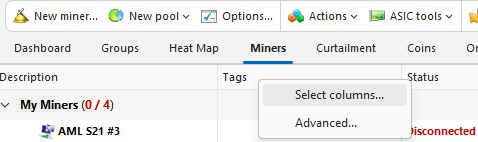
Select columns
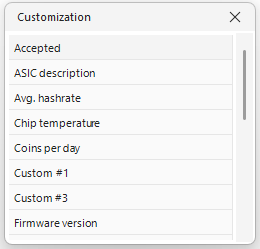
Via Select columns, a list of all available columns is displayed. To add from the list use one of the two methods:
- Double click on an item to add it as a column. The column will be added last.
- Perform a drag & drop to take one item from the list and drop it into the preferred position in the column header of the miner list
Remove columns
Columns can only be removed while the Customization popup is being displayed. To remove a column, drag the column caption and drop it outside the area of all column headers. The cursor will show a large X-sign to indicate that the column will be removed when dropped.
